Complete Job Posting Creation, Management, and Tracking System

Introduction

The Jobs module represents the strategic foundation of the Enterpristore recruitment platform, serving as the comprehensive command center where HR administrators and recruitment professionals orchestrate every aspect of their job posting operations. This sophisticated system transforms the traditionally fragmented process of job creation and management into a unified, streamlined workflow that provides complete control over the entire recruitment pipeline from initial job conceptualization to final hiring completion. Designed to handle both high-volume recruitment campaigns and specialized position requirements, the Jobs module combines powerful creation tools with advanced management capabilities, enabling administrators to craft detailed, SEO-optimized job postings while maintaining organizational structure through department categorization and intelligent filtering systems.

The platform’s intuitive interface seamlessly integrates job creation, real-time application tracking, performance analytics, and status management into a single dashboard that empowers recruitment teams to make data-driven decisions and optimize their hiring processes. Whether managing a single critical hire or coordinating hundreds of positions across multiple departments and locations, the Jobs module delivers the comprehensive functionality, organizational clarity, and operational efficiency needed to attract top talent, streamline administrative workflows, and maintain competitive advantage in today’s dynamic recruitment landscape.
Create New Job Posting

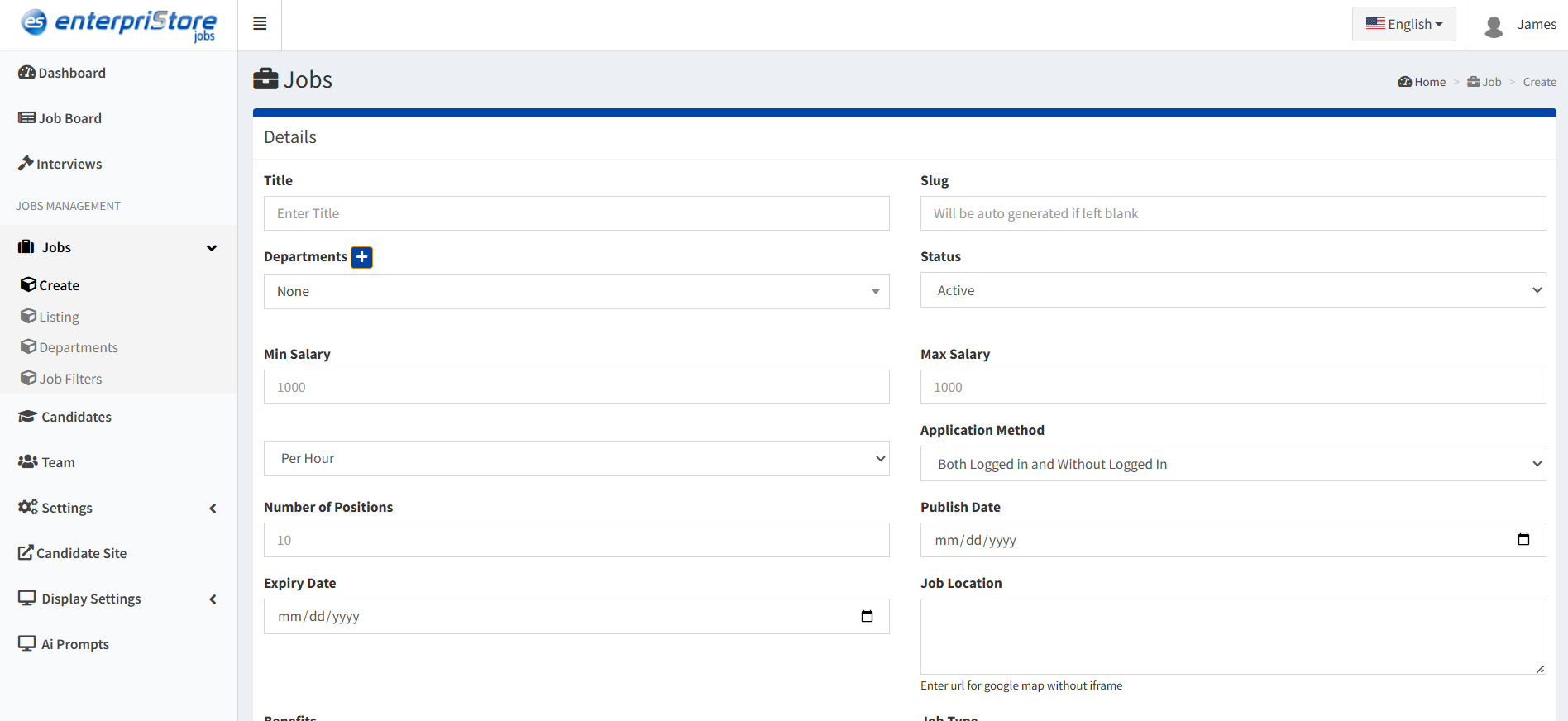
Comprehensive job creation interface with detailed customization options:

Job Details

  • Job Title & Slug: Define the position name and URL-friendly version for web optimization
  • Salary Range: Specify minimum and maximum salary ranges to attract suitable candidates
  • Job Description: Rich text editor for detailed role descriptions with formatting capabilities
  • Application Method: Choose how candidates apply: logged in users only, without login, or both options
  • Publishing Schedule: Set publish and expiry dates to control job visibility timeframes
  • Job Status: Control visibility with Draft, Published, or Pending Review status options
  • Employment Type: Select from Full Time, Part Time, Internship, or Freelance positions
  • Job Categories: Tag positions with relevant categories like Accounting, Construction, IT, etc.

Job Location & Requirements

  • Experience Level: Define required experience: Entry Level, Mid-Level, Senior, Executive
  • Work Type: Specify work arrangement: On-site, Remote, Hybrid, or Flexible
  • Location: Geographic location: city, region, or “Remote” for distributed teams
  • Departments: Assign to internal department or team for organizational structure
  • Number of Positions: Specify how many openings are available for this role

Custom Fields & SEO

  • Custom Fields: Add specialized fields for unique role requirements or company-specific criteria
  • Meta Keywords: SEO optimization keywords to improve job visibility in search engines
  • Meta Description: Brief job summary for search engine results and social media sharing

Job Creation Benefits:

  • Comprehensive job specification capabilities
  • SEO-optimized listings for better visibility
  • Flexible application methods to suit different roles
  • Organized department and category structure
  • Professional formatting with rich text editing
job-create

Job Listings Management

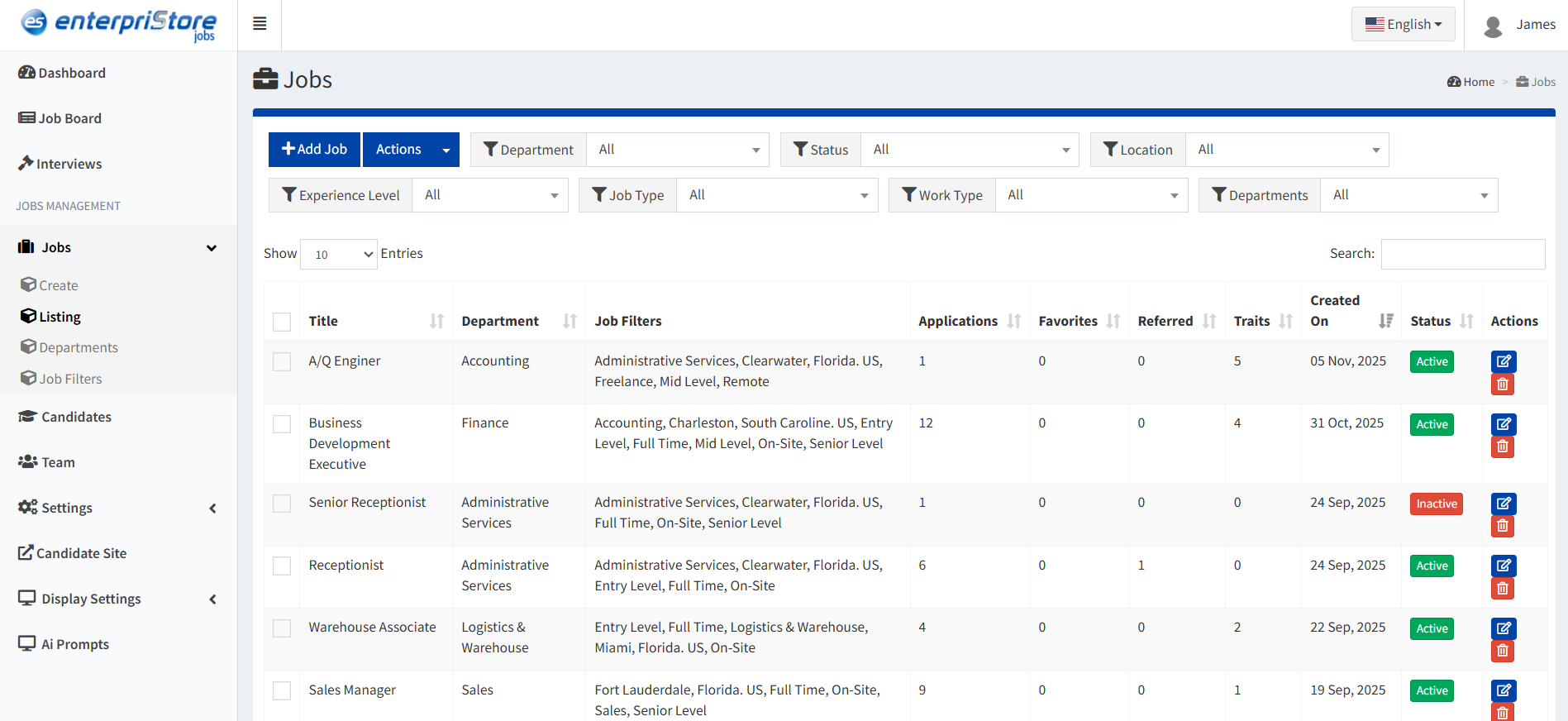
Centralized dashboard for managing all job postings with comprehensive tracking and control:

Job Listing Table

  • Title: Job position name with direct editing capability
  • Department: Internal department assignment for organization
  • Job Filters: Applied tags including work type, experience level, and location

  • Applications: Real-time count of candidate applications received
  • Favorites: Number of times candidates marked the job as favorite
  • Referrals: Count of referral submissions for the position
  • Created On: Job posting creation date for timeline tracking
  • Status: Current visibility status: Active or Inactive
  • Actions: Management tools: Edit, Delete, Status Change


Title Department Job Filters Applications Favorites Referrals Created On Status Actions
Backend Developer IT Full Time, Entry Level 15 5 2 2025-11-01 Active

Key Management Functions

Edit Job

  • Update job title, description, and requirements
  • Modify salary ranges and benefits
  • Adjust application methods and deadlines
  • Change department assignments

Delete Job

  • Remove outdated or incorrect listings
  • Clean up completed hiring processes
  • Maintain organized job database
  • Archive historical job data

Change Status

  • Toggle between Active and Inactive states
  • Control public visibility instantly
  • Pause applications when needed
  • Manage seasonal or temporary positions
jobs-listing

Advanced Job Filtering

Powerful filtering system for efficient job management and organization

  • Job Title Search: Quick text-based search for specific positions
  • Department Filter: Organize jobs by internal teams and divisions
  • Status Filter: Show Active, Inactive, or Draft jobs specifically
  • Experience Level: Filter by required candidate experience levels
  • Work Type: Separate on-site, remote, and hybrid positions
  • Location: Geographic filtering by city, region, or country

Filtering Benefits

  • Rapid location of specific job postings
  • Organized view of job categories and types
  • Efficient management of large job databases
  • Quick identification of posting performance
jobs-filter

Department Management

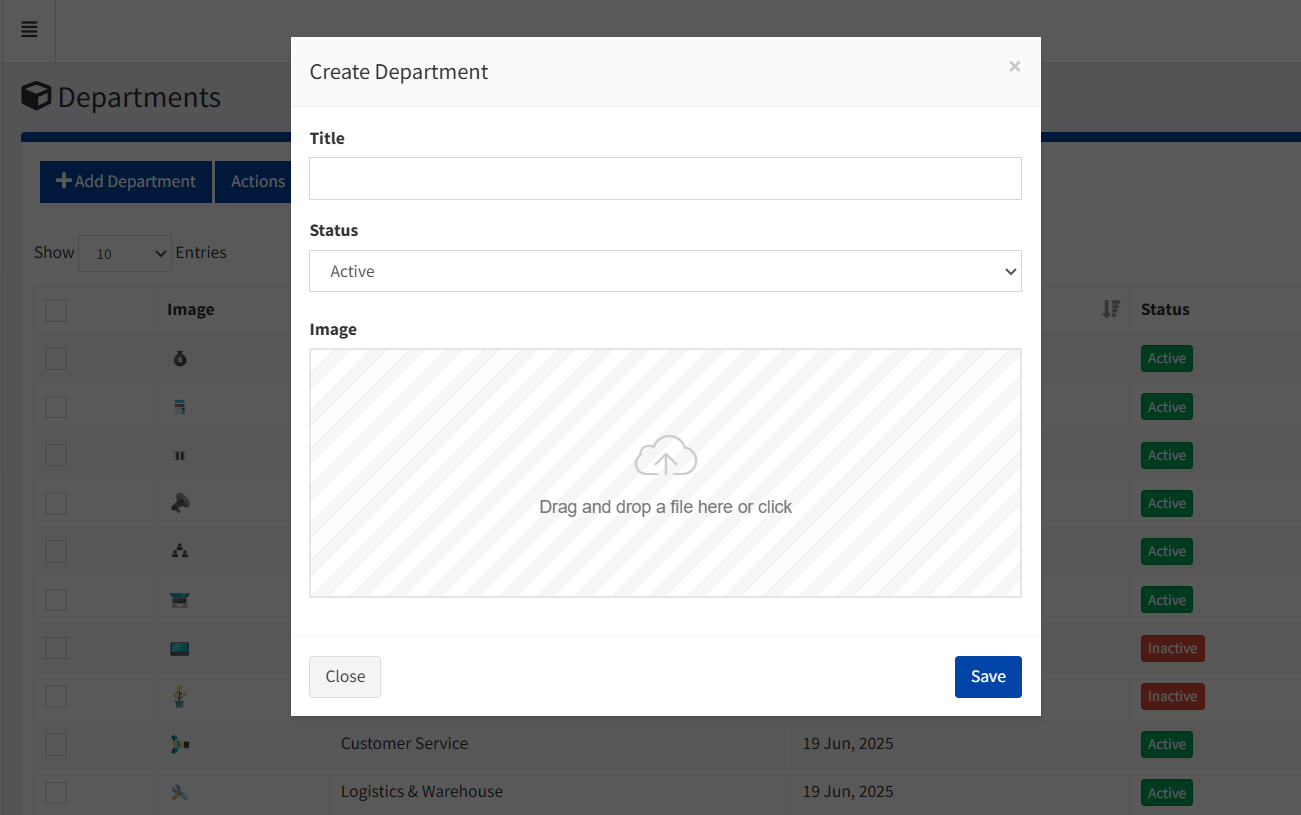
Department Creation

  • Add new organizational departments
  • Assign department icons and branding
  • Set department status (Active/Inactive)
  • Create hierarchical department structures

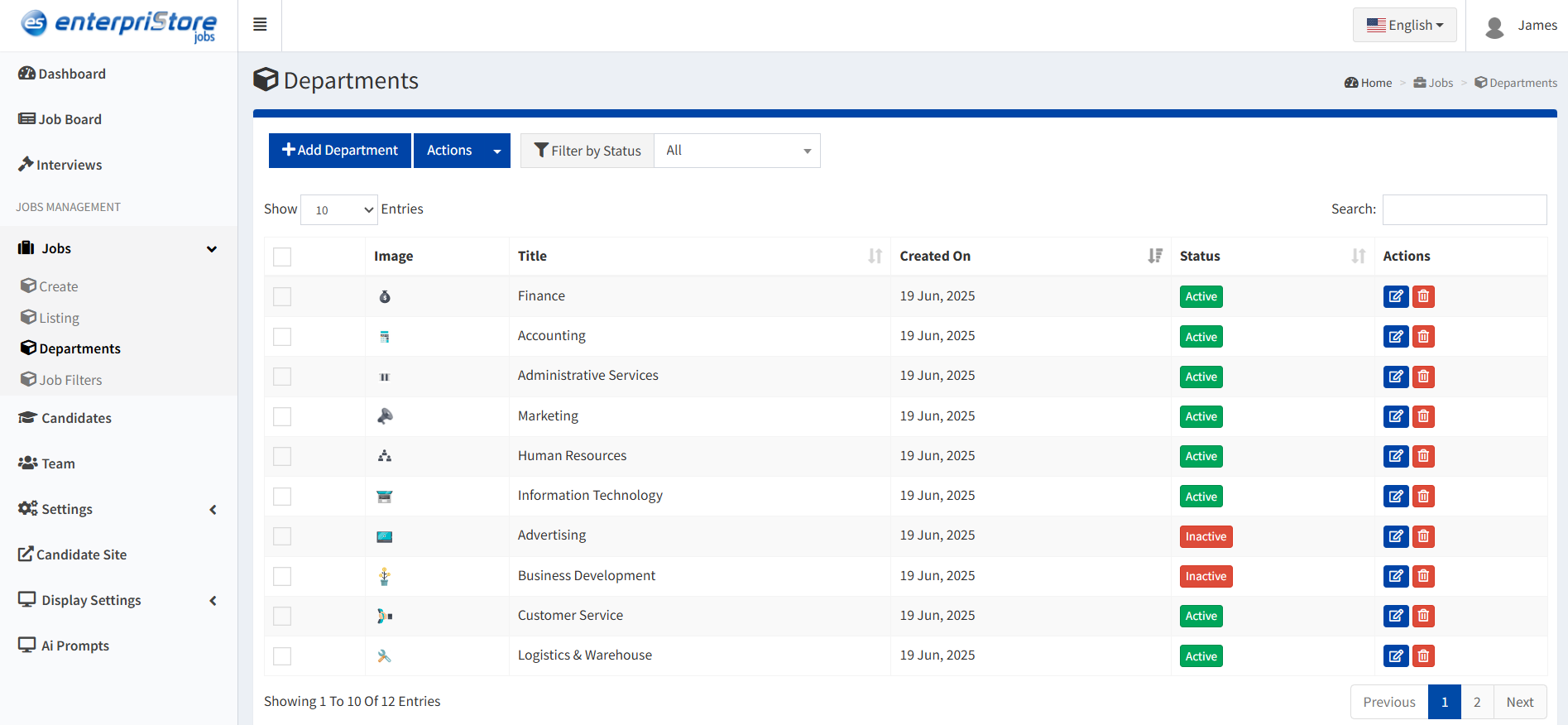
Department Overview

  • Visual department icons and identification
  • Creation date tracking
  • Status management controls
  • Job assignment statistics

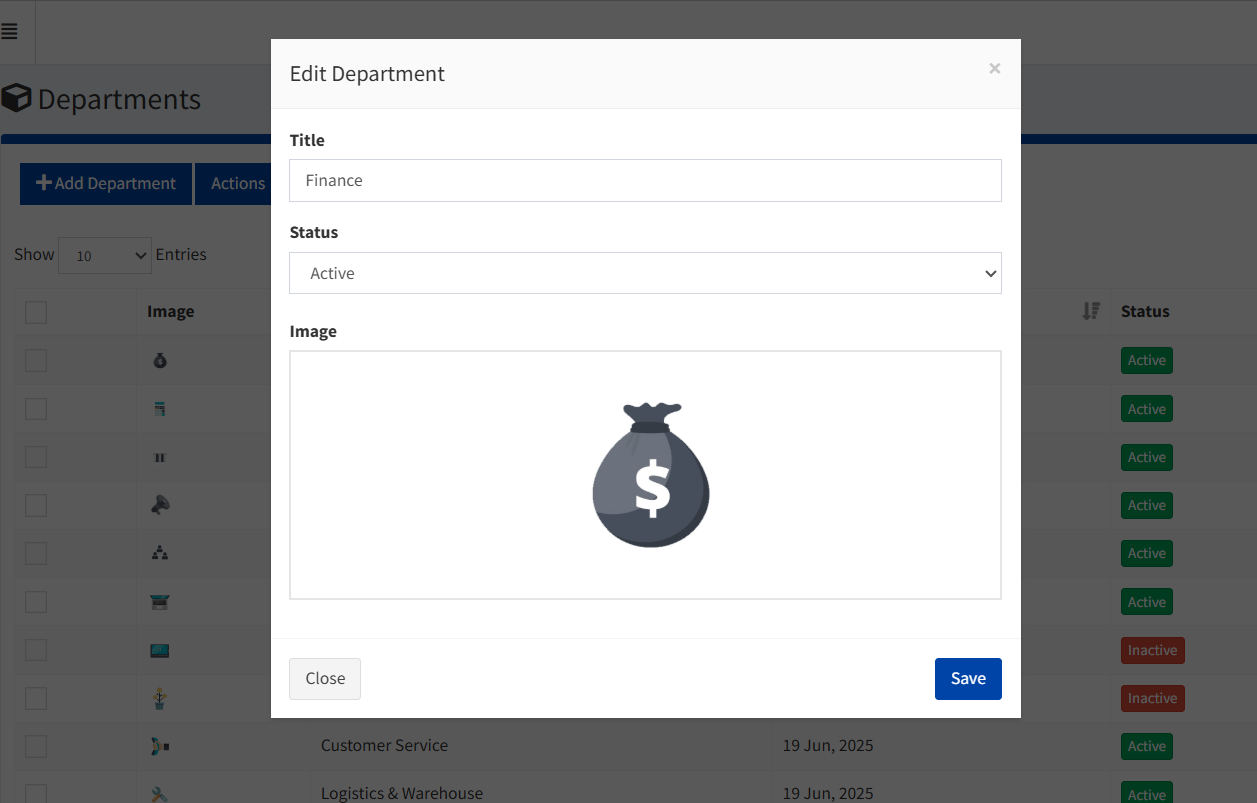
Department Editing

  • Update department names and descriptions
  • Modify visual branding elements
  • Change active/inactive status
  • Reorganize department hierarchy

Department Management Benefits:

  • Organized job categorization by business units
  • Improved internal reporting and analytics
  • Better candidate filtering and job discovery
  • Enhanced organizational structure representation
create-dept
dept

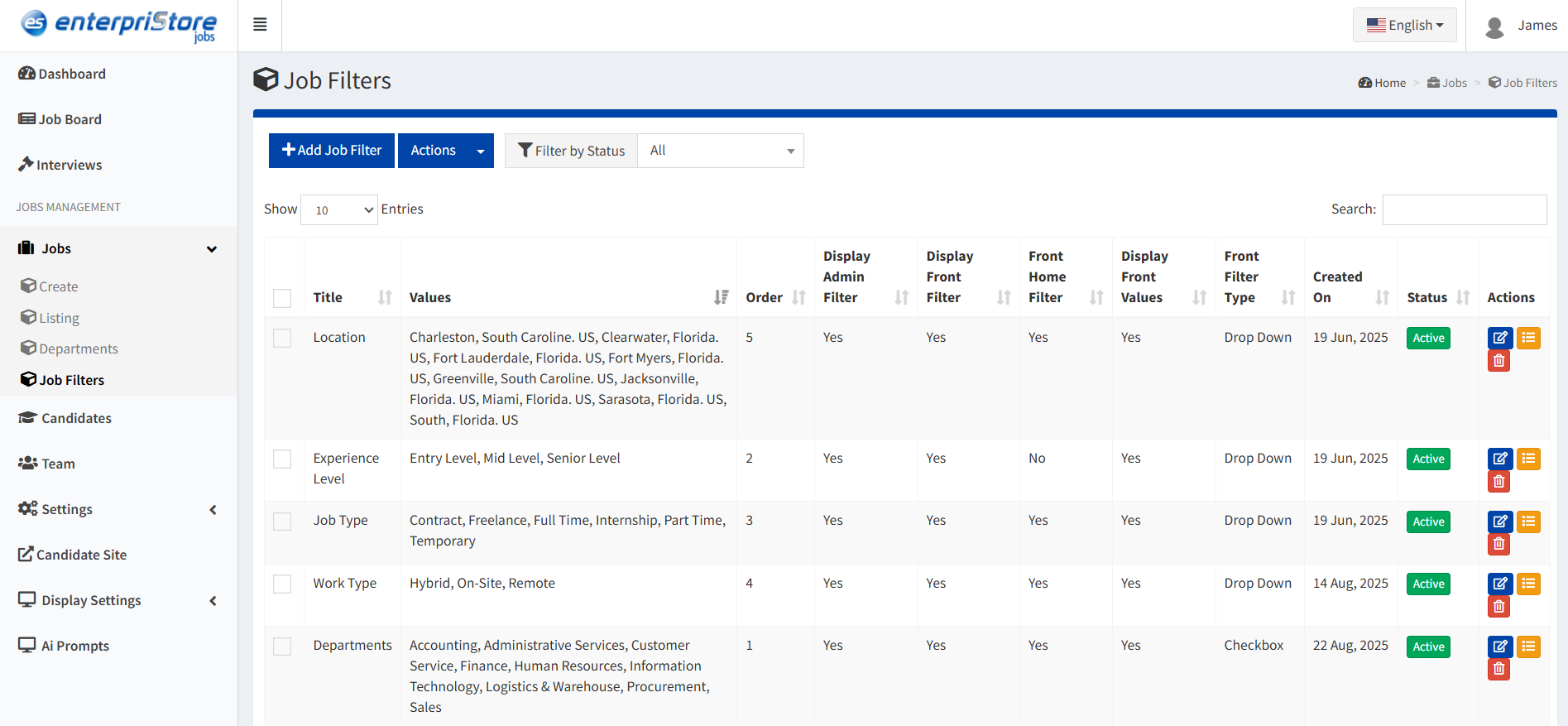
Job Filters Configuration

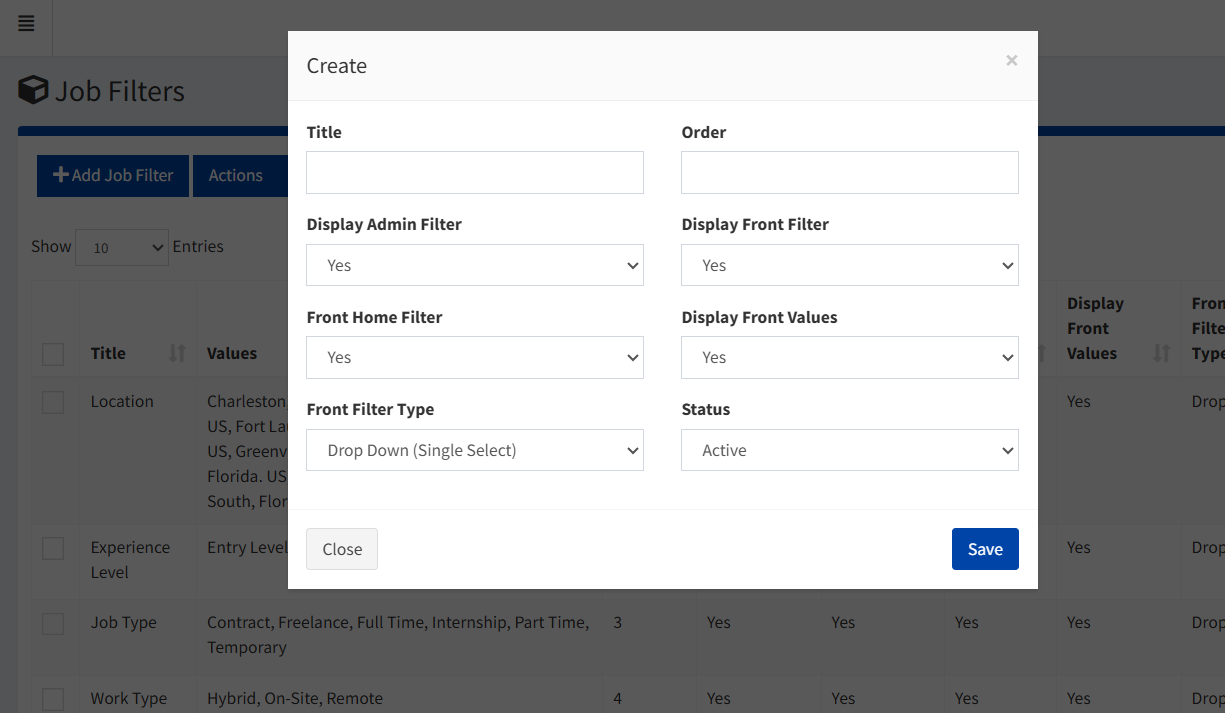
Filter Creation

  • Title & Order: Define filter name and display sequence
  • Admin Display: Show filter in admin job creation forms
  • Public Display: Display filter on public job board for candidates
  • Homepage Integration: Feature filter on homepage for quick access
  • Filter Type: Set interaction type (checkbox, dropdown, multi-select)

Filter Categories

  • Location Filters: Geographic job filtering options
  • Experience Level: Career stage requirements
  • Job Type: Employment classification (Full-time, Part-time, etc.)
  • Work Type: Work arrangement (Remote, On-site, Hybrid)
  • Industry Tags: Sector-specific categorization
  • Skill Requirements: Technical and soft skill filters
edit-dept

Complete Job Management Workflow

End-to-end job posting process from creation to completion:

  1. Job Creation– Use comprehensive form to create detailed job postings with all requirements
  2. Department Assignment– Organize jobs by department and apply relevant filters for categorization
  3. Publication Control– Set publish dates, expiry times, and visibility status for optimal timing
  4. Application Monitoring– Track applications, favorites, and referrals through the job listing dashboard
  5. Performance Analysis– Analyze job performance and make adjustments based on application data
  6. Job Completion– Update status to inactive and archive completed hiring processes
create-job-filter

Job Management Summary

The Jobs module provides comprehensive control over the entire job posting lifecycle:

  • Complete Creation Tools: Rich job posting creation with detailed customization options
  • Organizational Structure: Department management and hierarchical job organization
  • Advanced Filtering: Powerful search and categorization for efficient job management
  • Performance Tracking: Real-time monitoring of applications, favorites, and referrals
  • Quick Management: Efficient editing, status control, and job lifecycle management
  • SEO Optimization: Built-in SEO tools for improved job visibility and discovery
job-filter