Comprehensive Candidate Database with Advanced Profile Management and Tracking Capabilities

The Admin Candidates module stands as the strategic foundation of talent acquisition operations, transforming the traditional approach to candidate management from scattered, reactive processes into a sophisticated, centralized intelligence system that provides unprecedented visibility, control, and analytical depth across the entire candidate ecosystem. This comprehensive database management platform represents far more than a simple applicant tracking system—it serves as the authoritative repository for all talent-related data, enabling HR professionals to maintain complete oversight of every candidate interaction, application history, and professional progression while providing the advanced filtering, search, and management capabilities essential for modern, data-driven recruitment strategies.

Through its powerful combination of detailed profile management, real-time status tracking, advanced demographic and professional filtering, and comprehensive action tools, the Candidates module empowers administrators to transform raw applicant data into strategic talent intelligence, enabling precise candidate segmentation, efficient bulk operations, and informed hiring decisions based on rich, historical candidate insights. Whether managing a growing database of thousands of potential candidates, conducting targeted searches for specific skill sets and qualifications, or maintaining detailed records for compliance and analytical purposes, this robust platform provides the technological infrastructure and operational flexibility needed to optimize talent acquisition workflows while ensuring complete candidate data integrity, privacy protection, and seamless integration with broader recruitment processes across multiple positions, departments, and hiring timelines.
Candidate Database Structure

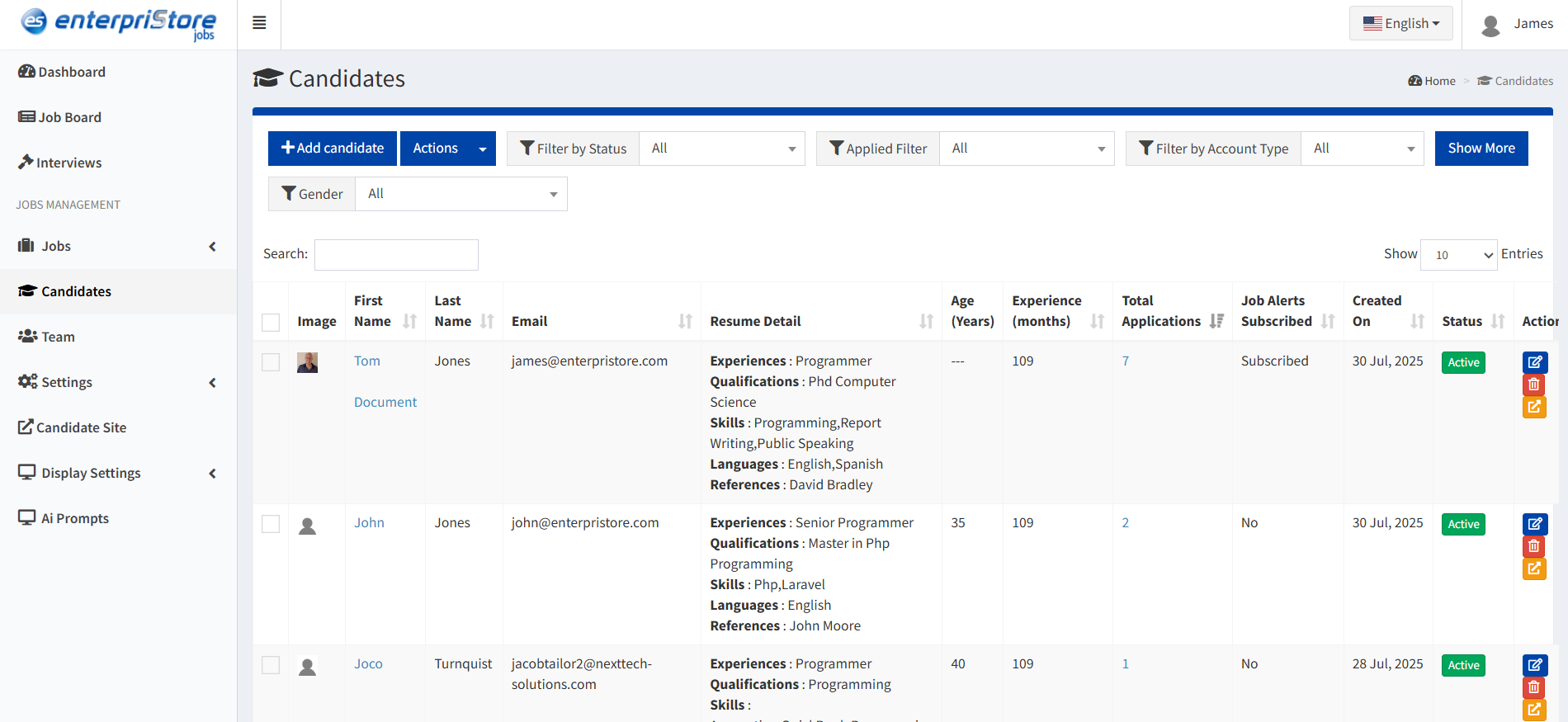
Structured table view displaying comprehensive candidate information for efficient management:

  • Profile Image: Candidate’s uploaded profile picture for easy identification
  • Name / Last Name: Complete candidate identification
  • Email Address: Primary communication channel
  • Resume Detail: Concise summary of qualifications and experience
  • Age: Candidate age information

  • Experience (Years): Total professional work experience
  • Total Applications: Number of jobs applied for
  • Join Date: Account registration date
  • Status: Account activity status (Active/Inactive)
  • Actions: Management and interaction tools

Candidate Management Actions

Comprehensive action tools for managing individual candidate profiles and accounts:

Edit Candidate:
Update and modify candidate profile information

Editable Fields:

  • Personal information (name, contact details)
  • Professional summary and biography
  • Contact information and location
  • Account settings and preferences
  • Profile picture and visual elements

Use Cases:

  • Correct data entry errors
  • Update contact information
  • Enhance incomplete profiles
  • Standardize data formats

View Profile:
Comprehensive read-only candidate information display

Profile Sections:

  • Complete resume and work history
  • Education and qualifications
  • Skills and competencies
  • Application history and status
  • Interview records and feedback

Benefits:

  • Complete candidate assessment
  • Historical data review
  • Hiring decision support
  • Team information sharing

Delete Candidate: Permanent removal of candidate records from the system Considerations:

  • Irreversible data deletion
  • GDPR compliance support
  • Data cleanup and maintenance
  • System performance optimization

Best Practices:

  • Verify deletion necessity
  • Consider data archiving first
  • Document deletion reasons
  • Ensure compliance requirements

Login as Candidate:
Administrative access to candidate account perspective

Functionality:

  • Switch to candidate view temporarily
  • Experience system as candidate does
  • Troubleshoot candidate-reported issues
  • Verify account setup and functionality

Use Cases:

  • Technical support and troubleshooting
  • Account verification and validation
  • User experience testing
  • Training and demonstration purposes

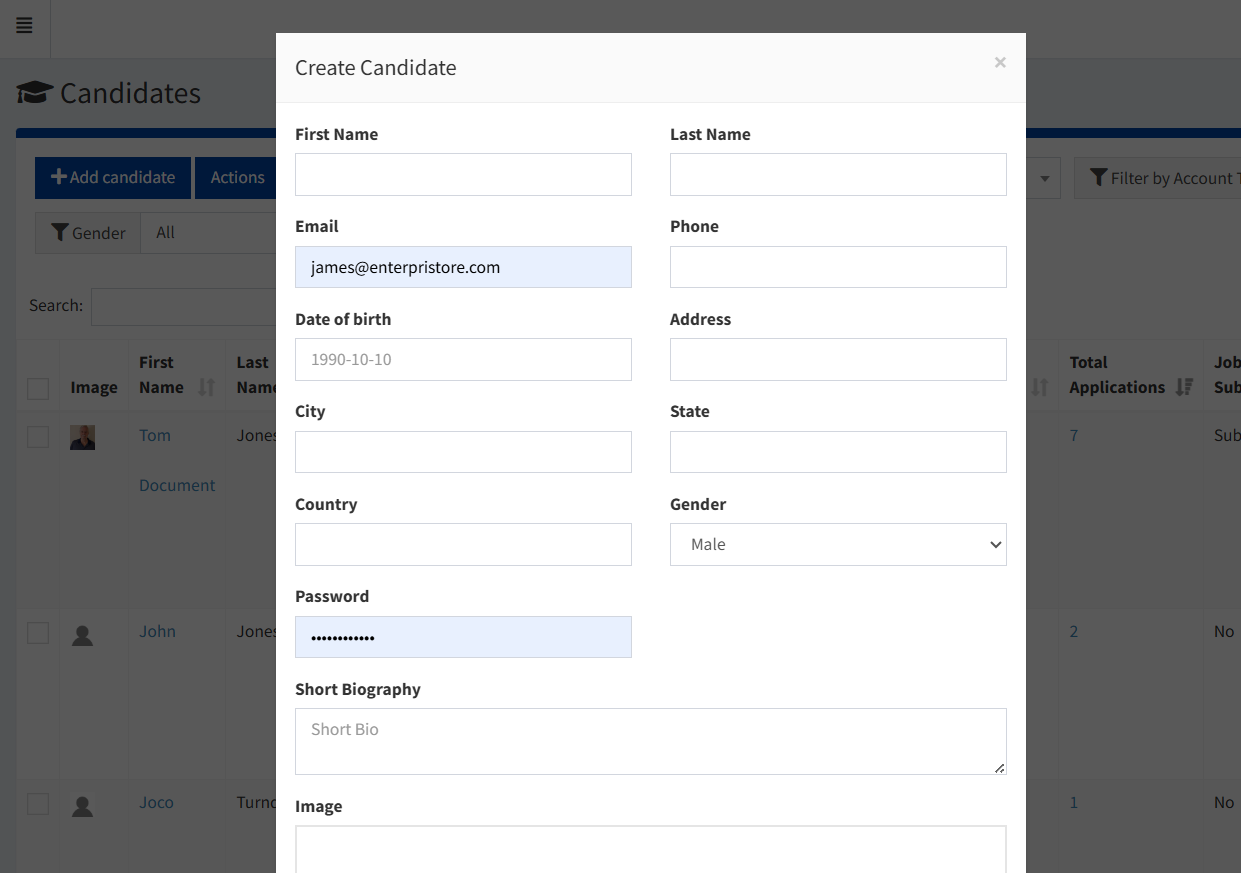
Add New Candidate: Administrative capability to manually create candidate profiles in the system

Personal Information:

  • First Name & Last Name: Complete candidate identification
  • Email Address: Primary communication and login credential
  • Phone Number: Direct contact information
  • Date of Birth: Age and demographic data

Location Details:

  • Address: Residential location information
  • City & State: Geographic identification
  • Country: International location tracking

Account Setup:

  • Password: Secure account access credential
  • Gender: Demographic information
  • Profile Image: Visual identification

Professional Summary:

  • Short Biography: Career highlights and background summary
  • Skills Overview: Key competencies and expertise areas

Benefits of Manual Addition:

  • Capture offline candidate information
  • Pre-populate candidate database
  • Support recruiting events and job fairs
  • Maintain comprehensive candidate records
  • Enable immediate candidate engagement
candidates

Advanced Filtering System

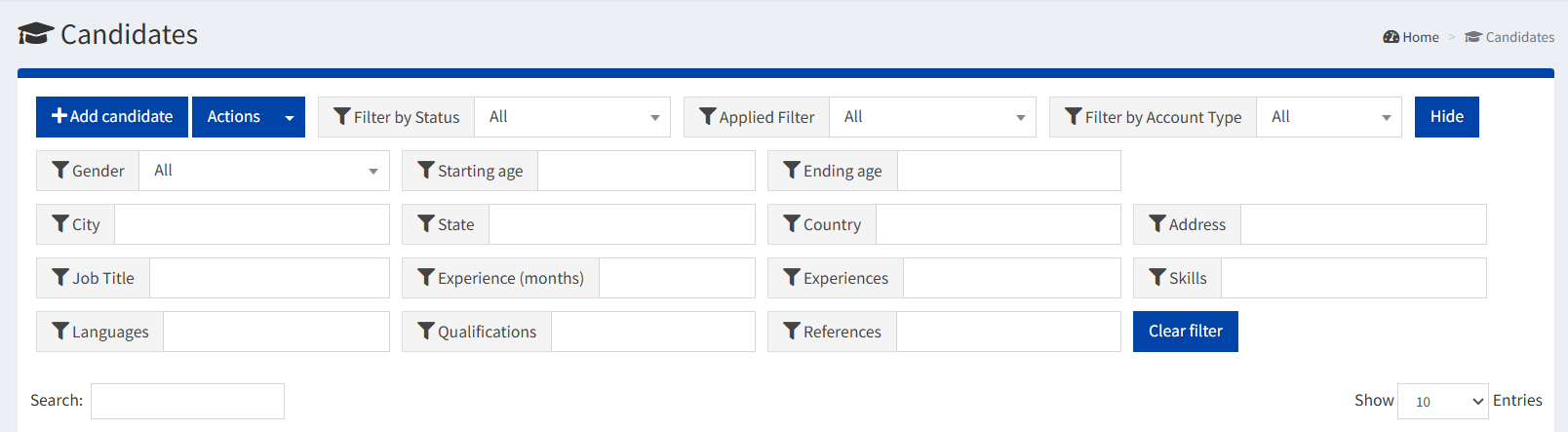
Powerful search and filter capabilities for precise candidate identification and segmentation:

Demographic Filters:

  • Gender-based Filtering: Segment candidates by gender for diversity tracking
  • Age Range Selection: Define starting and ending age parameters for targeted searches

Geographic Filters:

  • Location-based Search: Filter by city, state, or country for location-specific hiring
  • Address Keyword Search: Find candidates in specific areas or regions

Professional Filters:

  • Job Title Matching: Search candidates by current or past job titles
  • Experience Level: Filter by total months of professional experience
  • Skills-based Search: Locate candidates with specific technical or soft skills

Qualification Filters:

  • Educational Background: Filter by degrees, certifications, and qualifications
  • Language Proficiency: Search candidates by known languages and fluency levels

Status & Activity Filters:

  • Account Status: Show only active or inactive candidate accounts
  • Application History: Filter by candidates who have applied, not applied, or all
  • Account Type: Distinguish between self-registered and admin-added candidates

Filter Management:

  • Clear Filter: Reset all applied filters and return to full candidate list
  • Show More/Hide: Expand or collapse additional filter options
  • Save Filter Combinations: Store frequently used filter sets
  • Export Filtered Results: Download candidate lists based on applied filters
add-candidate

Candidate Management Benefits

The Candidates module provides comprehensive tools for effective talent management:

  • Centralized Database: Single source of truth for all candidate information with complete profile management
  • Advanced Search: Powerful filtering capabilities enable precise candidate identification and segmentation
  • Comprehensive Tracking: Complete visibility into candidate activity, applications, and hiring progress
  • Efficient Management: Quick actions and bulk operations streamline candidate database maintenance
  • Data Security: Role-based access control and secure data management ensure candidate privacy
  • Analytics Support: Rich candidate data enables reporting and analysis for data-driven hiring decisions
candidates-filters